Let’s pick it up from where we left it. You have added your first Holding. And for now, let’s assume it’s a single stock (e.g. Microsoft), which you added manually (i.e. without any external connection).
When you add your Microsoft shares, you are prompted to create a Portfolio or allocate those shares to an existing one; and once all details are in (trade date, price, fees), this is what Exirio will produce:


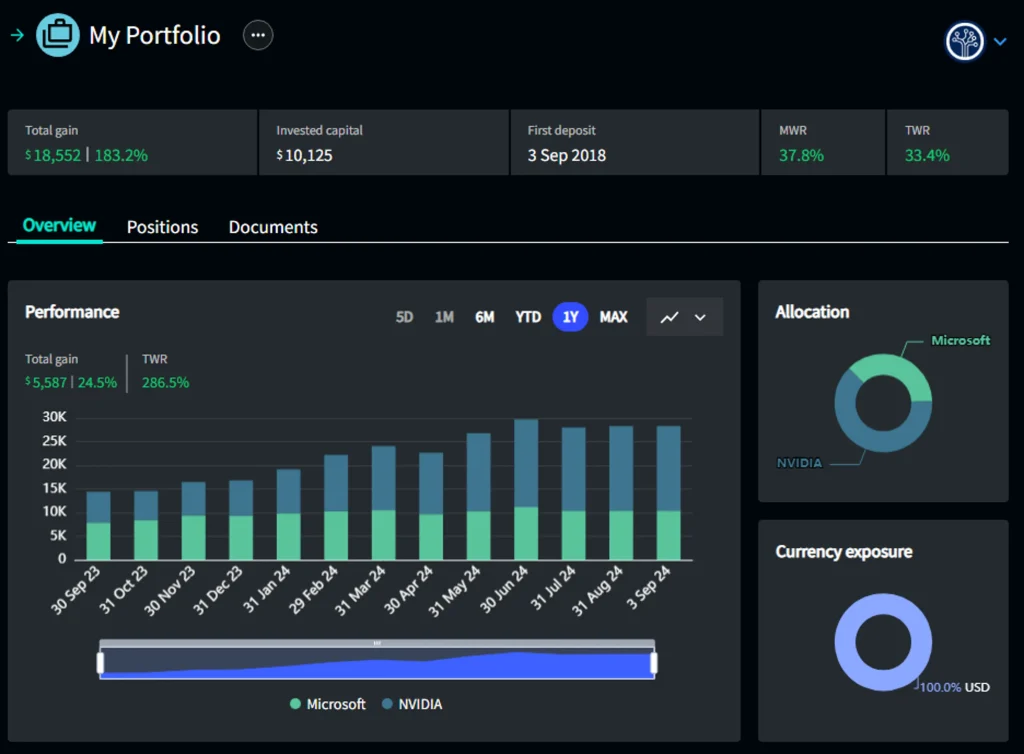
The full performance history of your investment is generated: the key metrics for the complete investment period are on the top line, while right on the graph you can select different time periods to generate the corresponding metrics. (All metrics have tooltips that provide detailed definitions).
About Holdings
This is probably the right time to make a distinction between “standard” Holdings and “non-standard” Holdings, and the easiest way to do it is telling you the non-standard ones.
These are investments into securities or crypto, and for these we call Holding the security portfolio (or retirement plan, wallet, etc), while the securities (or crypto) are Positions.
When we added Microsoft, we allocated it to a portfolio: the portfolio is the Holding, while Microsoft is a Position within the portfolio.
Standard Holdings are all other possible investments (real estate, private funds, luxury assets, etc).
If we now add another stock to this portfolio, Nvidia for example, the same performance analysis is presented at portfolio (Holding) level as well (with some additional data).
Data can be further aggregated at asset class level, and then in the comprehensive picture on your Home page.

Transactions in Exirio
So we are now tracking our two investments, Microsoft and Nvidia.
Exirio will update all performance metrics and valuations based on the last closing prices, delayed prices (20 minutes) or live prices – depending on the exchange (and your subscription).
We will also update all currency rates, so that if your Owner currency is different from your Holding currency, your overall performance will be adjusted accordingly.
The only thing you need to do is tell us if you sell or buy more shares! And you can do that by clicking on the Transactions tab.
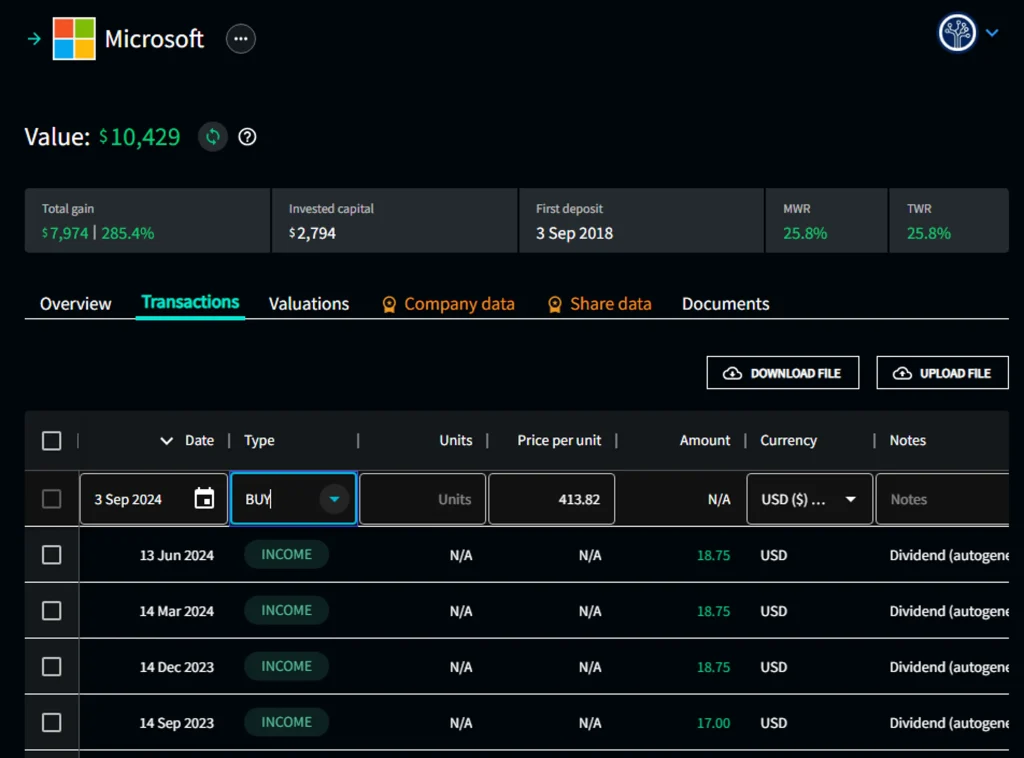
Because I am a Premium User, Exirio has automatically added historical dividend transactions (here there’s a list of the perks that come with a Premium subscription).
If I now want to record a ‘sell’ or a ‘buy’, all I have to do is fill in the details at the top of the table and voilà, the transaction is added. Or if you need to record multiple transactions, you can upload a csv file. That is, if you did not connect the brokerage account where those shares are held: because if you did, we retrieve all transactions automatically.
One last thing: if there are fees associated with a sell or a buy (execution fees, withholding tax, etc), you will need to add them as a separate transaction (“Expense”).
Valuations in Exirio
We have already seen that Exirio automatically updates all valuations for (pretty much) all stocks, ETFs, funds, crypto tokens and foreign currencies.
But there are several types of investment for which Exirio does not provide you with a valuation.
The reason is that we either don’t know it (a private investment), or we don’t know it better than you do.
And when I say “we”, I mean anyone.
Take a property for example: if you have added it to Exirio, you have given it a value. That is the value that you honestly think the property is worth. Short of an offer from a buyer or a third-party appraisal, that is the most appropriate valuation for you property. It is based on your knowledge of the local market, but it only starts with a price per sqm: you are likely to adjust it based on the conditions or specifications that (only) you know about your property. If Exirio gave you a price per sqm based on “similar” properties, we would be missing out on everything you know about your property that we don’t!
And besides, how often would you revaluate your property for your own tracking purposes?
In order to add a Valuation, well it’s just as easy: for all Holdings we don’t automatically provide a value for, there is a Valuation tab where to add (individually or in bulk) as many values as you want.
Let’s take an apartment that I bought for $250,000 which was valued $300,000 last year: after inputting the two valuations, the Holding will look like this:

Note the graph: the valuation line is flat from the date I recorded the purchase, and jumps overnight to the new value on revaluation date. Isn’t appreciation better represented by an upward curve?
It actually isn’t. Let me explain.
Exirio has no information to map any specific curve between those two points (and there are infinite) other than the one shown above. In other words, the only reliable value to use for any point in time between those two dates is the last available value.
Of course, nothing prevents me from adding as many data points as there are days between those two dates – and the graph will be better representative of the reality.
Mortgages
Since we are talking about properties, let’s see how Exirio deals with mortgages.
There are many different types of mortgage, and there are dozens of factors that make mortgages different across different jurisdictions. Therefore, we decided to keep it as simple for our Users as possible, and provide a straightforward mortgage calculator which – although not replicating exactly the specifics of a certain jurisdiction – is easier and faster to use. Of course, you can always change manually the values that Exirio generates.
When adding a real estate Holding, you will be asked if you have a mortgage or not. If you do, and provide the details, the result will look like this.

Using Exirio’s mortgage calculator means Exirio will automatically do several things:
- add all interest payments, as they occur.
- add all capital repayments, as they occur. This overtime reduces the mortgage balance and increases the ‘equity’ in the investment (this is why in the graph above the white line is upward sloping)
- update all metrics and refresh LTV (loan-to-value) after every mortgage payment date.
Recurring transactions
Mortgage interest payments are recurring transactions, i.e. they happen every month. For any type of transaction that occurs with predictable frequency and amount, Exirio lets you add it as a recurring transaction, so that you do not have to input the data more than once.

Once recurring transactions data are complete, the transaction table for that Holding will be automatically populated and the corresponding metrics updated every time.
What’s next
In this and the last post we aimed at giving you a brief and hopefully clear introduction to Exirio and its functionalities. A lot is happening in the kitchen and we release updates and new versions all the time, so these posts may soon become incomplete. But the logic behind Exirio won’t change, and hopefully you now have a clearer understanding of it, and the structure around it. If you need any additional help, feel free to consult our knowledge base or contact us at [email protected] anytime.
Happy tracking!